Introduction
In the modern SAP ecosystem, the RESTful ABAP Programming Model (RAP) is the standard framework for building scalable, cloud-ready business applications. A common enterprise requirement is the generation and printing of structured documents—such as goods receipt slips, purchase orders, or inspection reports—using Adobe Forms.
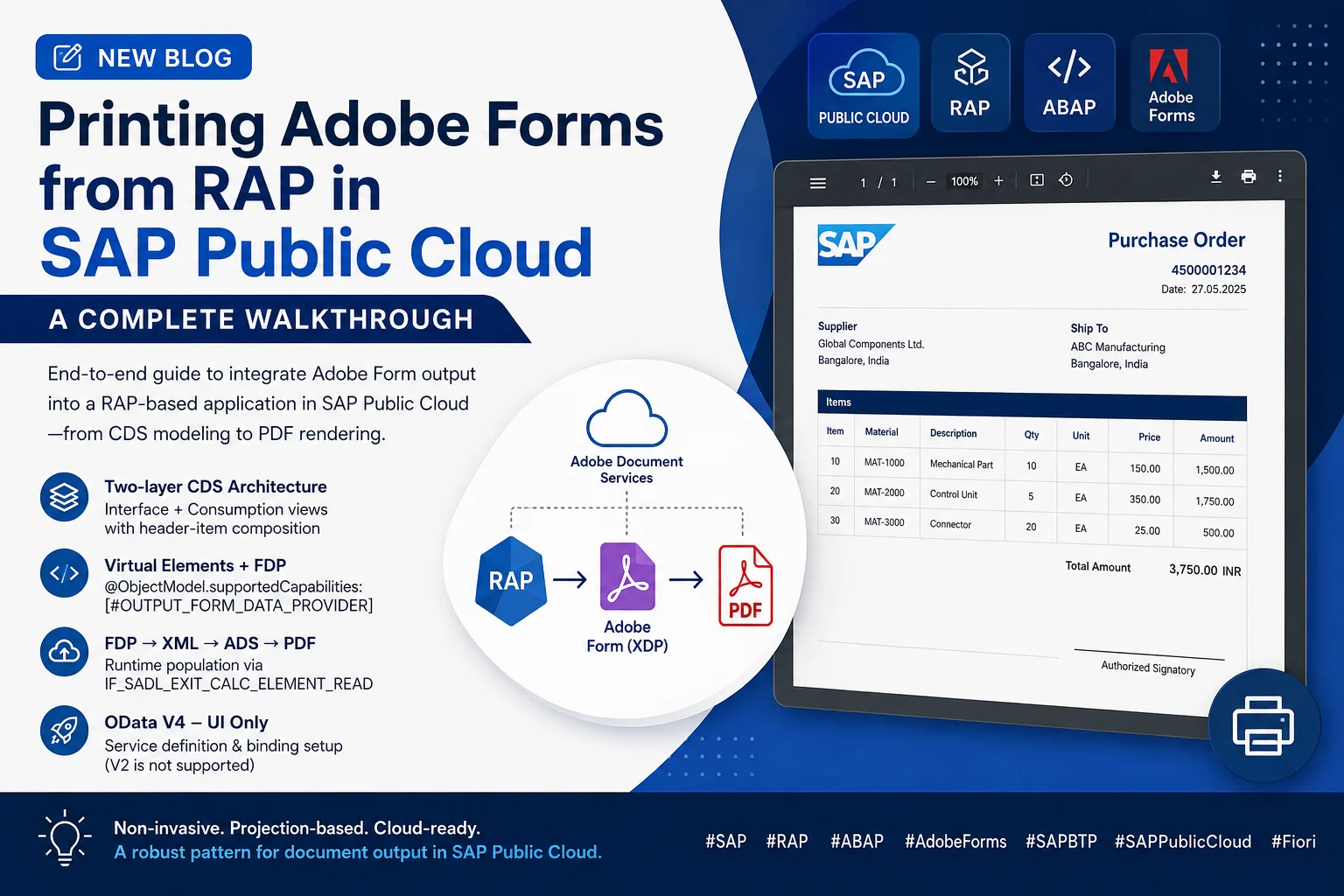
This guide provides a detailed, end-to-end walkthrough for integrating Adobe Form output within a RAP-based application in the SAP Public Cloud. By the end of this tutorial, you will have a fully functional solution that fetches business data via CDS views, processes it through an ABAP class, and delivers a rendered PDF using Adobe Document Services (ADS).
Development Objects Overview
The following table lists all development objects that will be created throughout this guide, along with their technical names and purpose:
| Object Name | Object Type | Description |
|---|---|---|
Z_RAP_ADOBE_PRINT |
Package | Container to organize all development objects |
ZI_ITEM |
Data Definition | Interface view for item-level data (base data model) |
ZC_ITEM |
Data Definition | Consumption view for item-level data, used in the UI/service |
ZI_HEADER |
Data Definition | Interface view for header-level data |
ZC_HEADER |
Data Definition | Consumption view for header-level data, exposed via the service |
ZC_HEADER_MDE |
Metadata Extension | UI annotations for the header consumption view |
ZAF_HEADER_FORM |
Adobe Form Object | Adobe Form layout and data interface definition |
ZCL_ADOBE_PRINT |
ABAP Class | Handles form data preparation and PDF generation logic |
ZSD_FORM_PRINT |
Service Definition | Defines the CDS entities exposed via the OData service |
ZSB_FORM_PRINT |
Service Binding | OData V4 service binding for UI consumption |
ZUI_HEADER_APP |
Fiori Application | UI application to trigger and display form output |
Step 1: Create a Package
The first step is to create a dedicated development package that will group all related artifacts under a single, manageable unit.
Why this matters:
- Keeps development objects logically structured and maintainable
- Facilitates proper transport request management across system landscapes
- Ensures all related objects are grouped for consistent deployment
Procedure:
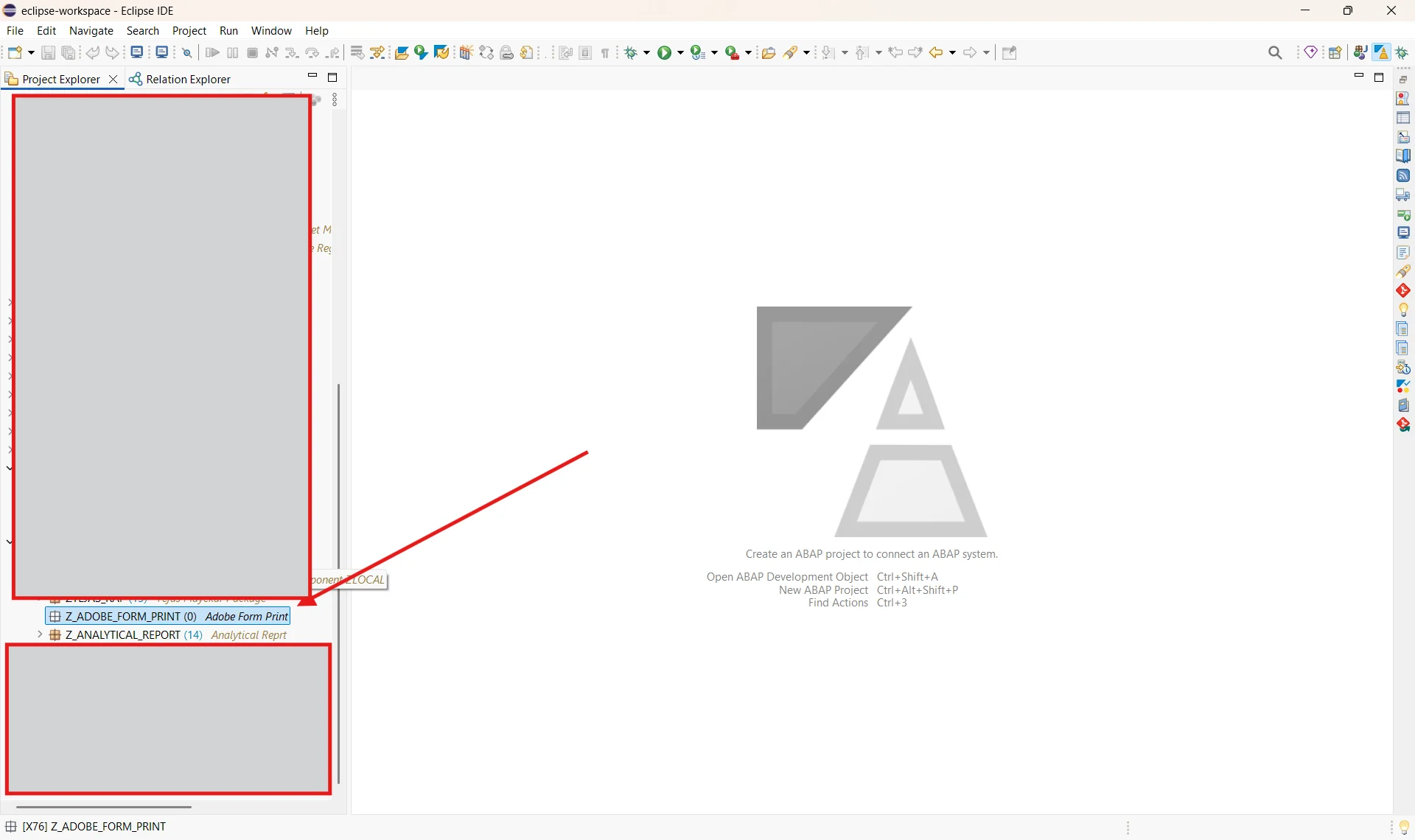
- Open ABAP Development Tools (ADT) in Eclipse.
- Right-click on your project in the Project Explorer.
- Navigate to New → ABAP Package.
- Enter the package name (
Z_RAP_ADOBE_PRINT) and a meaningful description. - Assign the package to an appropriate transport request.
Step 2: Create CDS Data Definitions
In this step, we create the CDS (Core Data Services) Data Definitions for both the Header and Item levels. These form the backbone of the RAP data model.
The solution follows a standard two-layer architecture:
- Interface Views (
ZI_) — Direct database access with joins and business logic; not exposed directly to consumers. - Consumption Views (
ZC_) — Projection views exposed to the OData service and UI.
Header and Item entities are connected via composition and association, establishing a well-defined parent-child relationship in the RAP entity model.
2.1 Header Interface View — ZI_HEADER
This view retrieves header-level goods movement data, enriched with supplier and purchase order details. It also defines the composition to the item-level entity.
@AbapCatalog.viewEnhancementCategory: [#NONE]
@AccessControl.authorizationCheck: #NOT_REQUIRED
@EndUserText.label: 'Interface View — Header Level Data'
@Metadata.ignorePropagatedAnnotations: true
define root view entity ZI_HEADER
  as select from I_MaterialDocumentHeader_2 as base
  inner join     I_MaterialDocumentItem_2   as exdata
    on  exdata.MaterialDocument     = base.MaterialDocument
    and exdata.MaterialDocumentYear = base.MaterialDocumentYear
    and (
          exdata.GoodsMovementType = '101'
       or exdata.GoodsMovementType = '541'
        )
    and exdata.MaterialDocumentItem = '0001'
  left outer join I_PurchaseOrderAPI01 as podata
    on podata.PurchaseOrder = exdata.PurchaseOrder
  left outer join I_Supplier as supp
    on supp.Supplier = exdata.Supplier

  composition [0..*] of ZI_ITEM as _Items
{
  key base.MaterialDocumentYear,
  key base.MaterialDocument,
      exdata.GoodsMovementType  as GoodsMovementType,
      exdata.Supplier,
      exdata.PurchaseOrder,
      podata.PurchaseOrderDate,

      -- Construct a single-line supplier address
      concat(
        concat(
          concat(
            concat(
              supp.SupplierFullName,
              case
                when supp.BPAddrStreetName is not null and supp.BPAddrStreetName <> ''
                then concat(', ', supp.BPAddrStreetName)
                else ''
              end
            ),
            case
              when supp.BPAddrCityName is not null and supp.BPAddrCityName <> ''
              then concat(', ', supp.BPAddrCityName)
              else ''
            end
          ),
          case
            when supp.DistrictName is not null and supp.DistrictName <> ''
            then concat(', ', supp.DistrictName)
            else ''
          end
        ),
        case
          when supp.PostalCode is not null and supp.PostalCode <> ''
          then concat(', ', supp.PostalCode)
          else ''
        end
      ) as address,

      base.DocumentDate,
      base.PostingDate,
      base.ReferenceDocument,

      _Items
}
2.2 Item Interface View — ZI_ITEM
This view retrieves item-level material document data and enriches it with inspection lot quantities, product descriptions, and current valuation prices. It defines an association back to the parent header entity.
@AbapCatalog.viewEnhancementCategory: [#NONE]
@AccessControl.authorizationCheck: #NOT_REQUIRED
@EndUserText.label: 'Interface View — Item Level Data'
@Metadata.ignorePropagatedAnnotations: true
define view entity ZI_ITEM
  as select from I_MaterialDocumentItem_2 as base
  left outer join I_InspectionLot         as inspdata
    on  inspdata.MaterialDocument     = base.MaterialDocument
    and inspdata.MaterialDocumentItem = base.MaterialDocumentItem
    and inspdata.MaterialDocumentYear = base.MaterialDocumentYear
  left outer join I_ProductDescription    as prd
    on  base.Material = prd.Product
    and prd.Language  = 'E'
  left outer join I_ProductValuationBasic as val
    on  val.Product       = base.Material
    and val.ValuationType = base.InventoryValuationType
    and val.ValuationArea = base.Plant

  association to parent ZI_HEADER as _Header
    on  _Header.MaterialDocument     = $projection.MaterialDocument
    and _Header.MaterialDocumentYear = $projection.MaterialDocumentYear
{
  key base.MaterialDocumentYear,
  key base.MaterialDocument,
  key base.MaterialDocumentItem,
      prd.ProductDescription,
      base.Material,
      base.EntryUnit,
      base.PurchaseOrder,

      @Semantics.quantity.unitOfMeasure: 'EntryUnit'
      base.QtyInPurchaseOrderPriceUnit,
      base.OrderPriceUnit,

      @Semantics.quantity.unitOfMeasure: 'EntryUnit'
      base.QuantityInEntryUnit,

      @Semantics.quantity.unitOfMeasure: 'EntryUnit'
      inspdata.InspLotQtyToFree,

      @Semantics.quantity.unitOfMeasure: 'EntryUnit'
      inspdata.InspLotQtyToBlocked,
      inspdata.InspectionLotQuantityUnit,

      -- Determine current price based on valuation procedure
      case
        when val.InventoryValuationProcedure = 'S'
          then cast(val.StandardPrice       as abap.dec(15,2))
        when val.InventoryValuationProcedure = 'V'
          then cast(val.MovingAveragePrice  as abap.dec(15,2))
        else 0
      end as CurrentPrice,

      _Header
}
where
  base.StorageLocation <> ''
2.3 Header Consumption View — ZC_HEADER
This projection view is exposed via the OData service and enables Adobe Form output by declaring virtual elements for the PDF attachment. These virtual elements are dynamically computed by the ABAP class ZCL_ADOBE_PRINT.
Important: The annotation
@ObjectModel.supportedCapabilities: [#OUTPUT_FORM_DATA_PROVIDER]is mandatory for enabling Adobe Form integration in a RAP service.
@AccessControl.authorizationCheck: #NOT_REQUIRED
@EndUserText.label: 'Header Consumption View — Form Output Enabled'
@ObjectModel.supportedCapabilities: [ #OUTPUT_FORM_DATA_PROVIDER ]
@Metadata.allowExtensions: true
define root view entity ZC_HEADER
  provider contract transactional_query
  as projection on ZI_HEADER
{
  key MaterialDocumentYear,
  key MaterialDocument,
      DocumentDate,
      PostingDate,
      GoodsMovementType,
      Supplier,
      address,
      ReferenceDocument,
      PurchaseOrder,
      PurchaseOrderDate,

      -- Virtual: PDF file name, computed by ZCL_ADOBE_PRINT
      @ObjectModel.virtualElementCalculatedBy: 'ABAP:ZCL_ADOBE_PRINT'
      @UI.hidden: true
  virtual FileName   : abap.char( 50 ),

      -- Virtual: MIME type of the generated document
      @ObjectModel.virtualElementCalculatedBy: 'ABAP:ZCL_ADOBE_PRINT'
      @Semantics.mimeType: true
      @UI.hidden: true
  virtual MimeType   : abap.char( 50 ),

      -- Virtual: Binary PDF content returned as attachment
      @ObjectModel.virtualElementCalculatedBy: 'ABAP:ZCL_ADOBE_PRINT'
      @Semantics.largeObject: {
        mimeType: 'MimeType',
        fileName: 'FileName',
        contentDispositionPreference: #ATTACHMENT
      }
  virtual Attachment : abap.rawstring( 0 ),

      _Items : redirected to composition child ZC_ITEM
}
2.4 Item Consumption View — ZC_ITEM
@AccessControl.authorizationCheck: #NOT_REQUIRED
@EndUserText.label: 'Item Consumption View'
@Metadata.allowExtensions: true
define view entity ZC_ITEM
  as projection on ZI_ITEM
{
  key MaterialDocumentYear,
  key MaterialDocument,
  key MaterialDocumentItem,
      ProductDescription,
      Material,
      EntryUnit,
      PurchaseOrder,
      QtyInPurchaseOrderPriceUnit,
      OrderPriceUnit,
      QuantityInEntryUnit,
      InspLotQtyToFree,
      InspLotQtyToBlocked,
      InspectionLotQuantityUnit,
      CurrentPrice,
      _Header : redirected to parent ZC_HEADER
}
2.5 Header Metadata Extension — ZC_HEADER_MDE
This metadata extension defines UI annotations for the header consumption view, controlling which fields appear in the list report and selection filter bar on the Fiori UI.
@Metadata.layer: #CORE
annotate entity ZC_HEADER with
{
  @UI.lineItem:       [{ position: 10 }]
  @UI.selectionField: [{ position: 10 }]
  MaterialDocument;

  @UI.lineItem:       [{ position: 20 }]
  @UI.selectionField: [{ position: 20 }]
  MaterialDocumentYear;

  @UI.lineItem: [{ position: 30 }]
  PostingDate;

  @UI.lineItem: [{ position: 40 }]
  GoodsMovementType;

  @UI.hidden: true
  FileName;

  @UI.hidden: true
  MimeType;

  @UI.lineItem: [{ position: 50 }]
  Attachment;
}
Step 3: ABAP Class for Adobe Form Processing — ZCL_ADOBE_PRINT
The class ZCL_ADOBE_PRINT serves as the engine for PDF generation. It implements the interface IF_SADL_EXIT_CALC_ELEMENT_READ, which allows it to dynamically compute the virtual elements declared in ZC_HEADER.
Responsibilities of this class:
- Retrieving entity data from the RAP CDS model using the Form Data Provider (FDP) API
- Serializing CDS data into the XML format required by the Adobe Form interface
- Invoking Adobe Document Services (ADS) to render the final PDF
- Populating the
Attachment,FileName, andMimeTypevirtual fields on the entity instance
CLASS zcl_adobe_print DEFINITION
  PUBLIC
  FINAL
  CREATE PUBLIC.

  PUBLIC SECTION.

    INTERFACES if_sadl_exit_calc_element_read.

    CLASS-METHODS:
      get_pdf
        IMPORTING
          im_v_pr         TYPE zc_header-materialdocument
          im_v_year       TYPE zc_header-materialdocumentyear
        RETURNING
          VALUE(rt_v_pdf) TYPE xstring
        RAISING
          cx_fp_fdp_error
          cx_fp_form_reader
          cx_fp_ads_util.

    CLASS-DATA:
      mc_duplicate_call TYPE abap_boolean.

ENDCLASS.


CLASS zcl_adobe_print IMPLEMENTATION.

  METHOD if_sadl_exit_calc_element_read~calculate.

    DATA lt_pr_header TYPE STANDARD TABLE OF zc_header.
    lt_pr_header = CORRESPONDING #( it_original_data ).

    LOOP AT lt_pr_header ASSIGNING FIELD-SYMBOL(<fs_s_header>).

      " Only generate the PDF when the Attachment field is explicitly requested,
      " and guard against duplicate calls within the same request cycle.
      IF line_exists( it_requested_calc_elements[ table_line = 'ATTACHMENT' ] )
      AND mc_duplicate_call IS INITIAL.

        TRY.
            <fs_s_header>-attachment = get_pdf(
              im_v_pr   = <fs_s_header>-materialdocument
              im_v_year = <fs_s_header>-materialdocumentyear
            ).

          CATCH cx_fp_fdp_error cx_fp_form_reader cx_fp_ads_util INTO DATA(lx_data).
            mc_duplicate_call = abap_false.
            DATA(lv_message) = lx_data->get_text( ).
            " TODO: Forward lv_message to an application log if required.
        ENDTRY.

      ENDIF.

      " Always populate the metadata fields regardless of PDF generation outcome.
      <fs_s_header>-filename = |{ <fs_s_header>-materialdocument ALPHA = OUT }_output.pdf|.
      <fs_s_header>-mimetype = 'application/pdf'.

    ENDLOOP.

    ct_calculated_data = CORRESPONDING #( lt_pr_header ).

  ENDMETHOD.


  METHOD if_sadl_exit_calc_element_read~get_calculation_info.
    " Declare the source fields required to compute the virtual elements.
    APPEND to_upper( 'MaterialDocument' )     TO et_requested_orig_elements.
    APPEND to_upper( 'MaterialDocumentYear' ) TO et_requested_orig_elements.
  ENDMETHOD.


  METHOD get_pdf.

    mc_duplicate_call = abap_true.

    " Initialize the FDP API with the service definition and a read depth of 1.
    DATA(lo_fdp_api) = cl_fp_fdp_services=>get_instance(
      iv_max_depth          = 1
      iv_service_definition = 'ZSD_FORM_PRINT' ).

    DATA(lt_keys) = lo_fdp_api->get_keys( ).

    " Assign the composite key values to drive the entity data read.
    lt_keys[ name = 'MATERIALDOCUMENT' ]-value     = im_v_pr.
    lt_keys[ name = 'MATERIALDOCUMENTYEAR' ]-value = im_v_year.

    " Read entity data and serialize to XML for ADS consumption.
    DATA(lv_data) = lo_fdp_api->read_to_xml_v2( it_select = lt_keys ).

    " Guard: abort if no data was returned for the given key combination.
    IF lv_data IS INITIAL.
      mc_duplicate_call = abap_false.
      RAISE EXCEPTION TYPE cx_fp_fdp_error.
    ENDIF.

    " Load the Adobe Form layout from the form repository.
    DATA lv_formname TYPE fpname.
    lv_formname = 'ZAF_HEADER_FORM'.

    DATA(lo_reader) = cl_fp_form_reader=>create_form_reader( lv_formname ).
    DATA(ls_layout) = lo_reader->get_layout( ).

    " Call ADS to render the XML data against the XDP layout and return the PDF binary.
    cl_fp_ads_util=>render_pdf(
      EXPORTING
        iv_xml_data   = lv_data
        iv_xdp_layout = ls_layout
        iv_locale     = 'en_US'
      IMPORTING
        ev_pdf        = rt_v_pdf
    ).

    mc_duplicate_call = abap_false.

  ENDMETHOD.

ENDCLASS.
Step 4: Create the Service Definition — ZSD_FORM_PRINT
The service definition specifies which CDS entities are exposed through the OData service. The @ObjectModel.leadingEntity annotation designates ZC_HEADER as the primary, root-level entity of this service.
@EndUserText.label: 'Form Print Service — Exposed CDS Entities'
@ObjectModel.leadingEntity.name: 'ZC_HEADER'
define service ZSD_FORM_PRINT {
  expose ZC_HEADER as Header;
  expose ZC_ITEM   as Items;
}
Step 5: Create the Service Binding — ZSB_FORM_PRINT
To expose the service for Fiori UI consumption, create a Service Binding with the following configuration:
- Binding Type: OData V4 — UI
- Service Definition:
ZSD_FORM_PRINT
Note: Adobe Form output in RAP is only supported with OData V4 – UI service bindings. OData V2 or non-UI bindings are not compatible with this integration.
After saving the binding, click Publish to register the service. Once published, use the Preview action to launch the Fiori Elements application directly from ADT and verify the setup before deploying to the Fiori Launchpad.
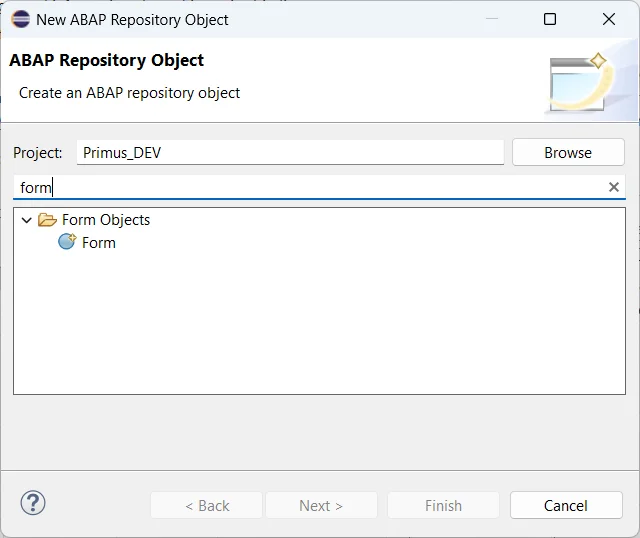
Step 6: Create the Adobe Form Object — ZAF_HEADER_FORM
Create a new Adobe Form object in the SAP system using transaction SFP, or directly from within ADT.
Upon initial creation, the system will display a warning indicating that no XDP layout has been uploaded yet. This is expected behavior and the warning will persist until a valid layout file is provided.
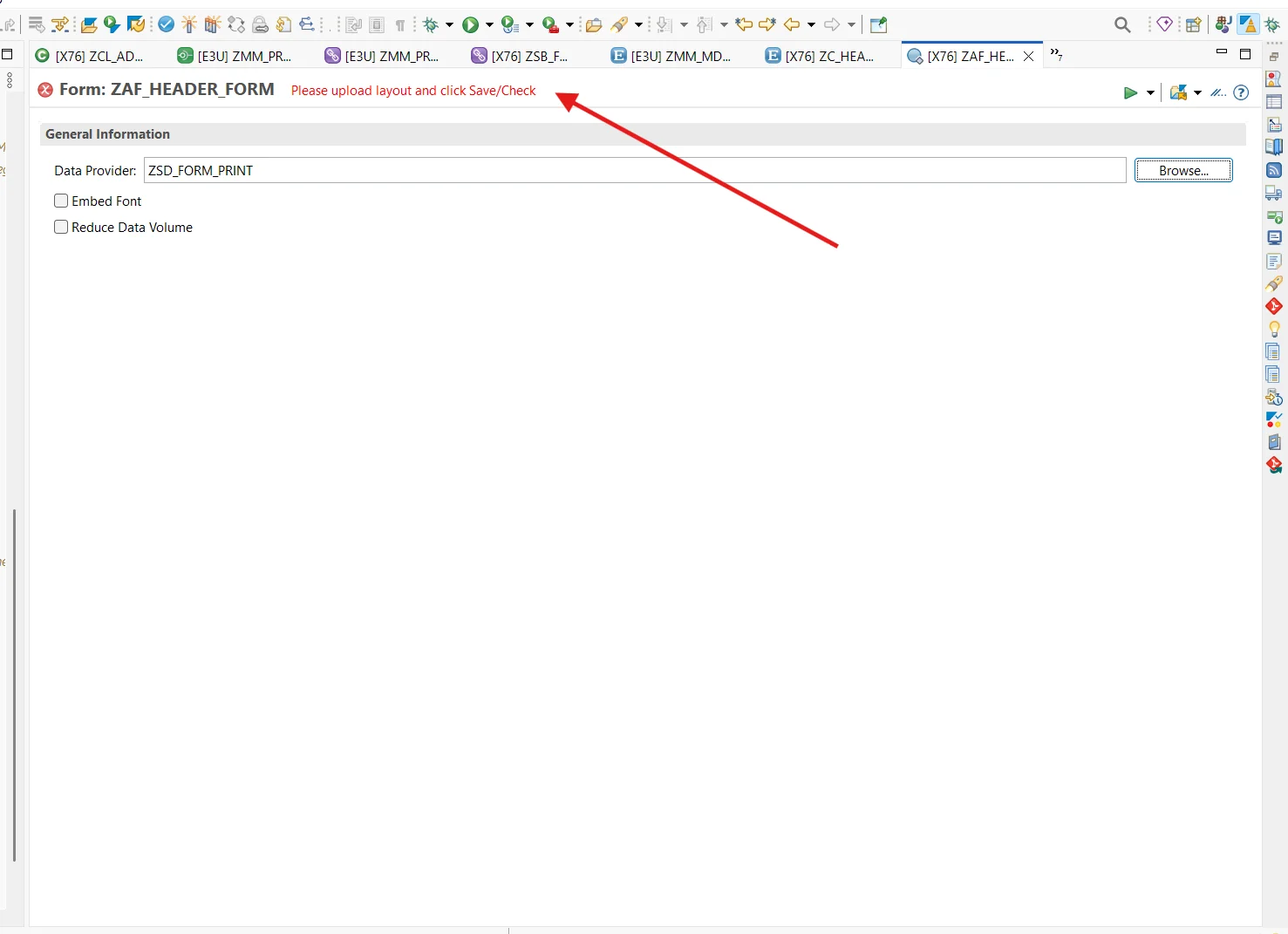
To complete the form setup:
- From the form object, download the generated XSD schema file. This schema precisely defines the XML structure that the FDP API will produce at runtime, and must be used as the data binding source for the form layout.
- Open Adobe LiveCycle Designer (or a compatible form design tool) and create your form layout (
.xdpfile) using the downloaded XSD schema. Bind each form field to its corresponding schema element. - Upload the completed
.xdplayout file back into the SAP form object.

Once the layout is successfully uploaded, the form object is fully configured and ready for rendering by the ZCL_ADOBE_PRINT class.
Step 7: Test and Verify Output
With all development objects in place, the solution is ready for end-to-end testing via the Fiori application.
Procedure:
- Launch the Fiori application (
ZUI_HEADER_APP) from the Fiori Launchpad or directly via the ADT Preview. - Enter a valid Material Document Number in the selection field and execute the search.
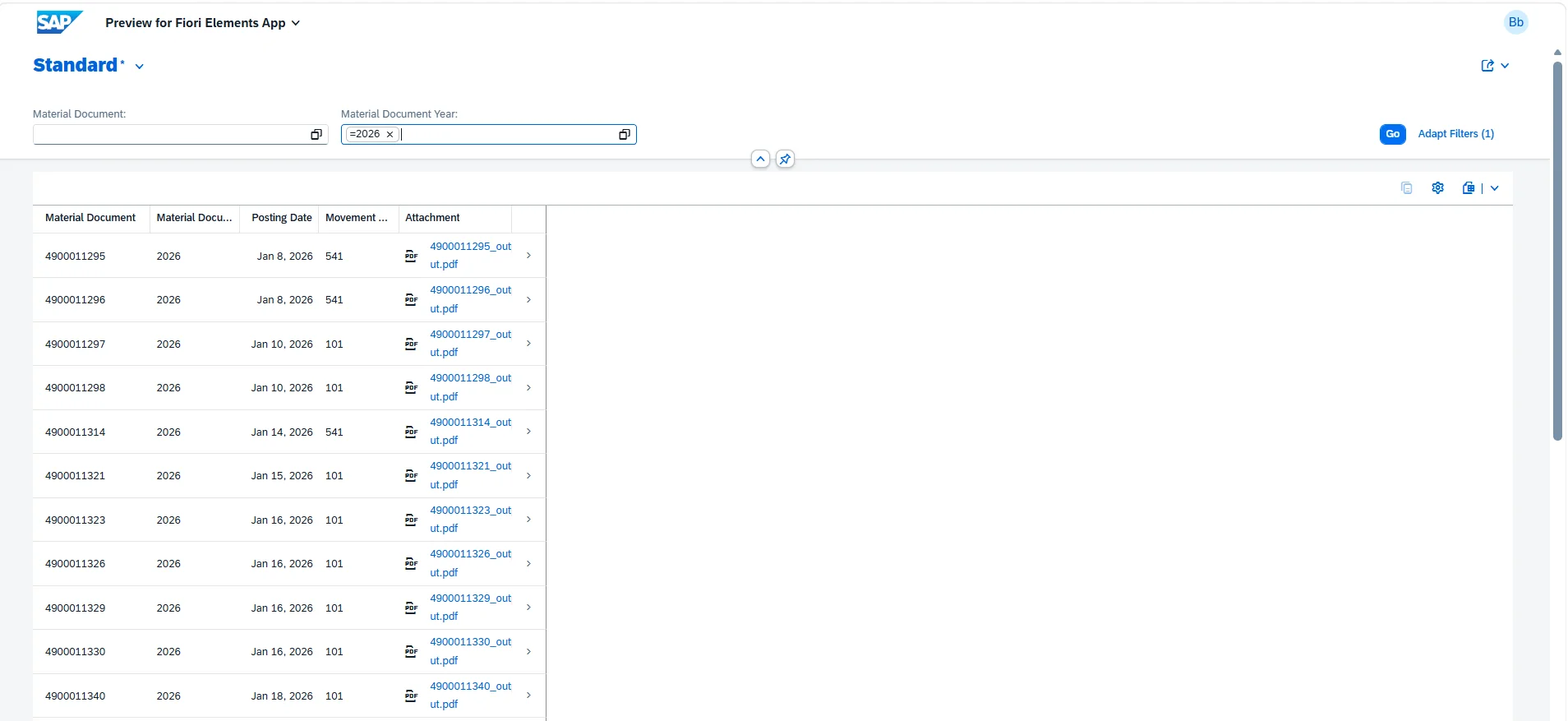
- The list report will display matching document records. Locate the Attachment column and click the document link to trigger PDF generation.
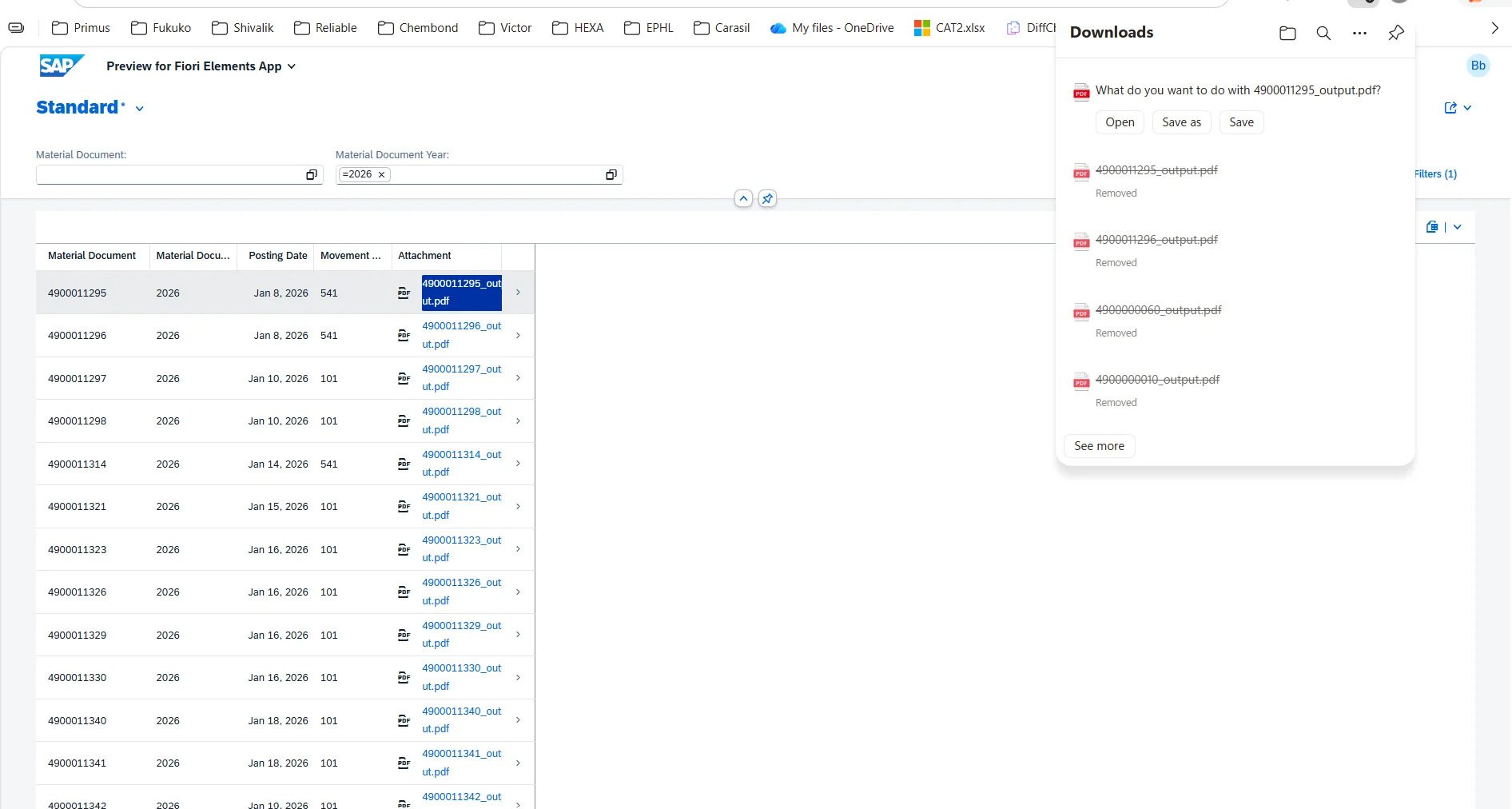
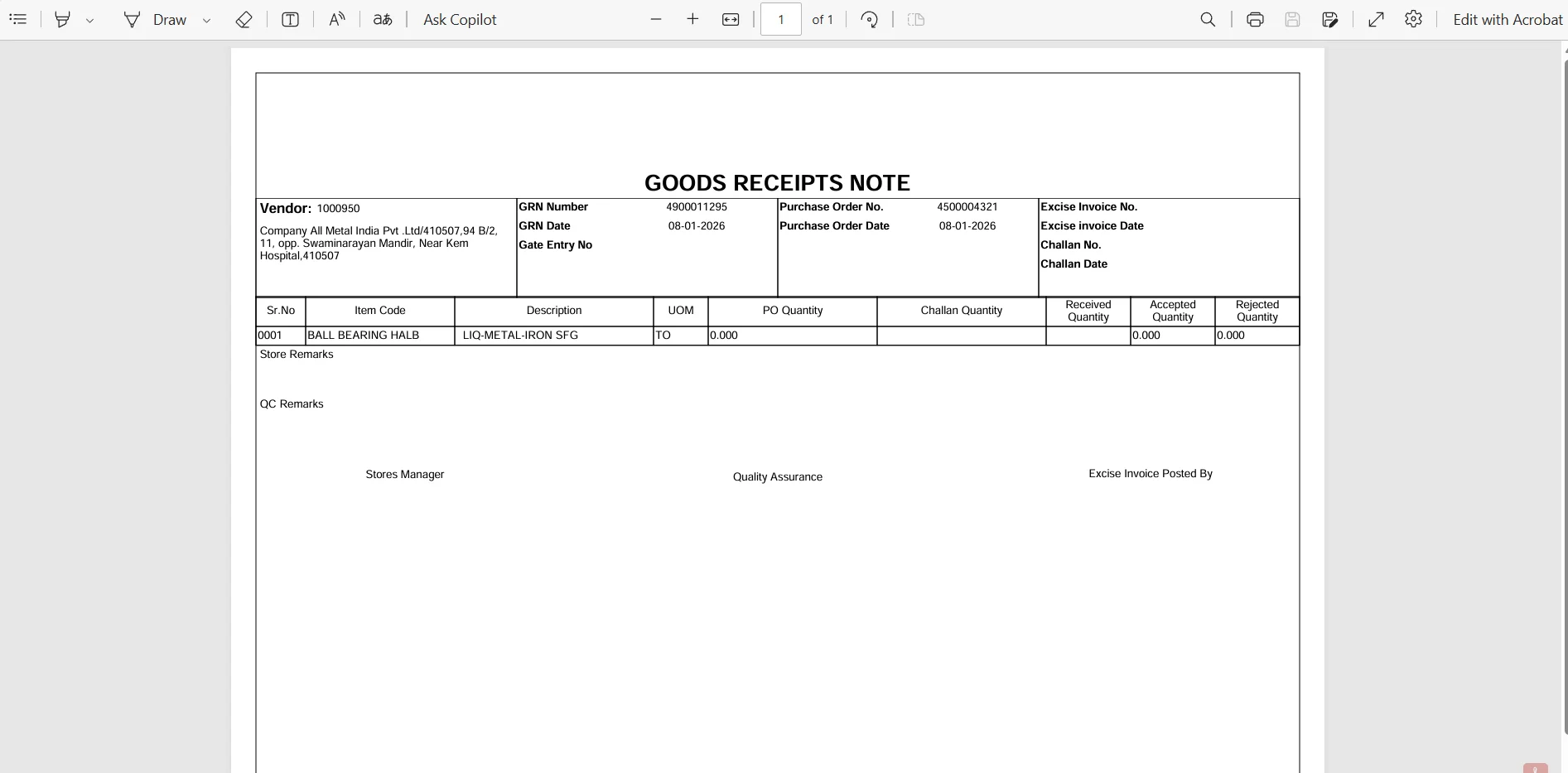
- The system invokes
ZCL_ADOBE_PRINT, renders the Adobe Form via ADS, and streams the resulting PDF to the browser as a downloadable attachment.
If the PDF does not render, verify the following:
- The XDP layout has been successfully uploaded to
ZAF_HEADER_FORM - The service binding
ZSB_FORM_PRINThas been published - The composite key fields (
MaterialDocument,MaterialDocumentYear) are correctly passed through the FDP API call - Adobe Document Services (ADS) is properly configured and reachable in the target system
Summary
The following diagram illustrates the complete end-to-end flow of the solution:
Fiori UI (ZUI_HEADER_APP)
        │
        ▼
OData V4 Service (ZSB_FORM_PRINT)
        │
        ▼
Consumption View (ZC_HEADER)  ──── Virtual Elements (FileName, MimeType, Attachment)
        │                                        │
        ▼                                        ▼
Interface View (ZI_HEADER)           ZCL_ADOBE_PRINT (IF_SADL_EXIT_CALC_ELEMENT_READ)
        │                                        │
        ▼                                        ▼
Database Tables (I_MaterialDocument*)     FDP API → XML → ADS → PDF (XSTRING)
This pattern—using virtual elements populated by an ABAP class that calls ADS via the FDP API—is the recommended approach for Adobe Form integration in SAP Public Cloud RAP applications. It is non-invasive, purely projection-based, and fully compatible with the cloud ABAP programming model.